
Imfuna

Lettings & Property Management

Property inventory software for letting agents and inventory clerks

Section 21 is gone. The evidence has not.

Every tenancy evidenced, every property on schedule: inventories, mid-terms and check-outs compared side by side against the original record and signed by tenants online - evidence designed to meet TDS, DPS and mydeposits adjudication standards. The compliance dashboard keeps inspections and statutory checks on time across the whole portfolio.
What the platform does for you

Check-in sets the baseline

The inventory records condition, cleanliness, meters and keys room by room - the record every later visit is judged against.

Re-inspect, side by side

Mid-terms and check-outs open against the original inventory, so you record what changed - original photo next to new capture.

Comparison & arbitration reports

Before-and-after comparison reports, plus a dedicated arbitration format built for deposit-dispute adjudication.

Tenants in the loop

Share the report with tenants and landlords: they review the PDF and its photos, comment clause by clause, agree and sign digitally.

Repairs & dilapidations

Flag disrepair with photos and costs as you inspect; flagged issues push to Fixflo as work tickets, with notes and photos attached.

360° room capture

Pair a Ricoh Theta and capture whole rooms in 360° - viewable in the report alongside standard photos.

Meters, keys and certificates

Readings, key handovers and certificates captured in the same visit, in the same record.

Evidence that keeps

Reports freeze on generation - a re-render is byte-identical - with originals kept tamper-evident for seven years.

How letting agents, inventory clerks and landlords work with Imfuna

The same sequence, from arriving on site to the issued report - and what each step takes off your desk.

01The baseline, set

Check-in

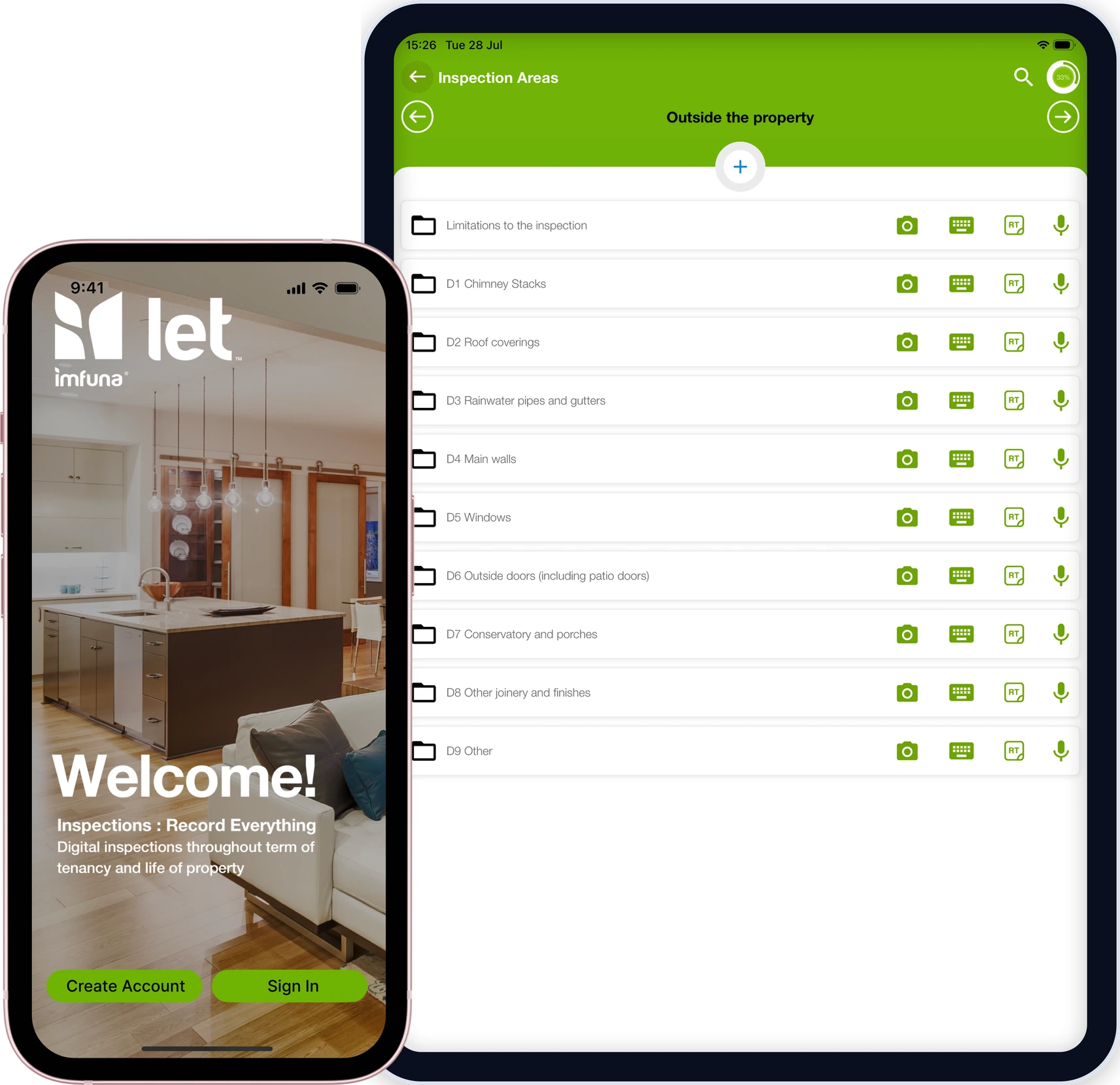
Room-by-room condition and cleanliness, meter readings, keys and photo evidence - the professional inventory that sets the baseline the whole tenancy is judged against.

  • Condition, cleanliness, meters and keys, room by room
  • Photos time-stamped against the item they evidence
  • Tenants comment clause by clause and sign at the start
The Imfuna Let app on a phone and tablet: an inventory in progress with its rooms, photos and condition entries.
02Change caught early

Mid-term

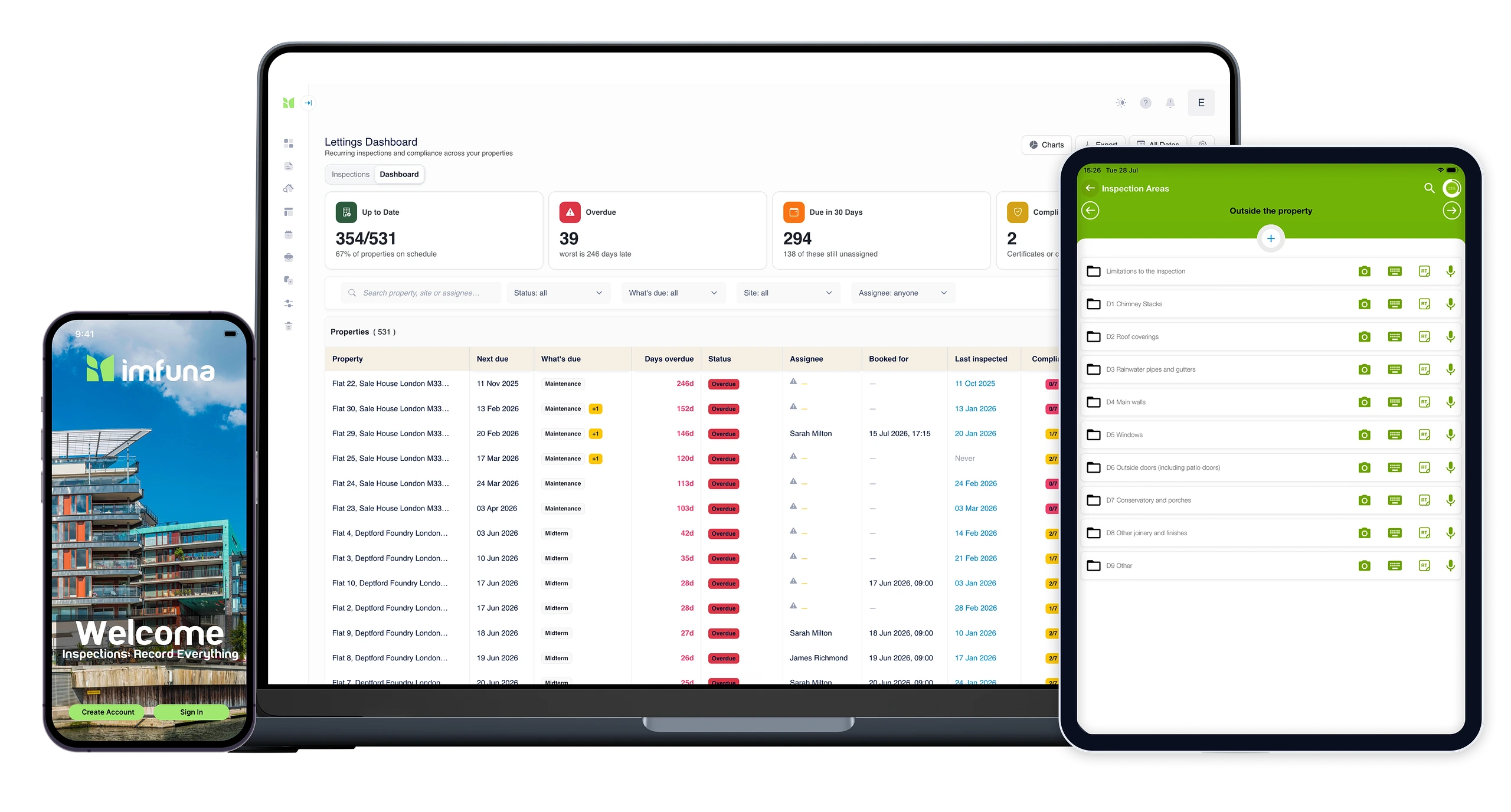
Quick periodic visits compared side by side against the original inventory, so change is documented while it is still small.
  • Visits open against the original inventory
  • Original photo next to new capture - change documented while it is small
  • Recurring schedules keep every property's next visit on the calendar
The lettings dashboard's schedules view on a laptop: recurring inspection schedules per property with their next due dates.
03Side-by-side proof

Check-out

Before-and-after comparison reports and a dedicated arbitration report format for when a deposit deduction is challenged.
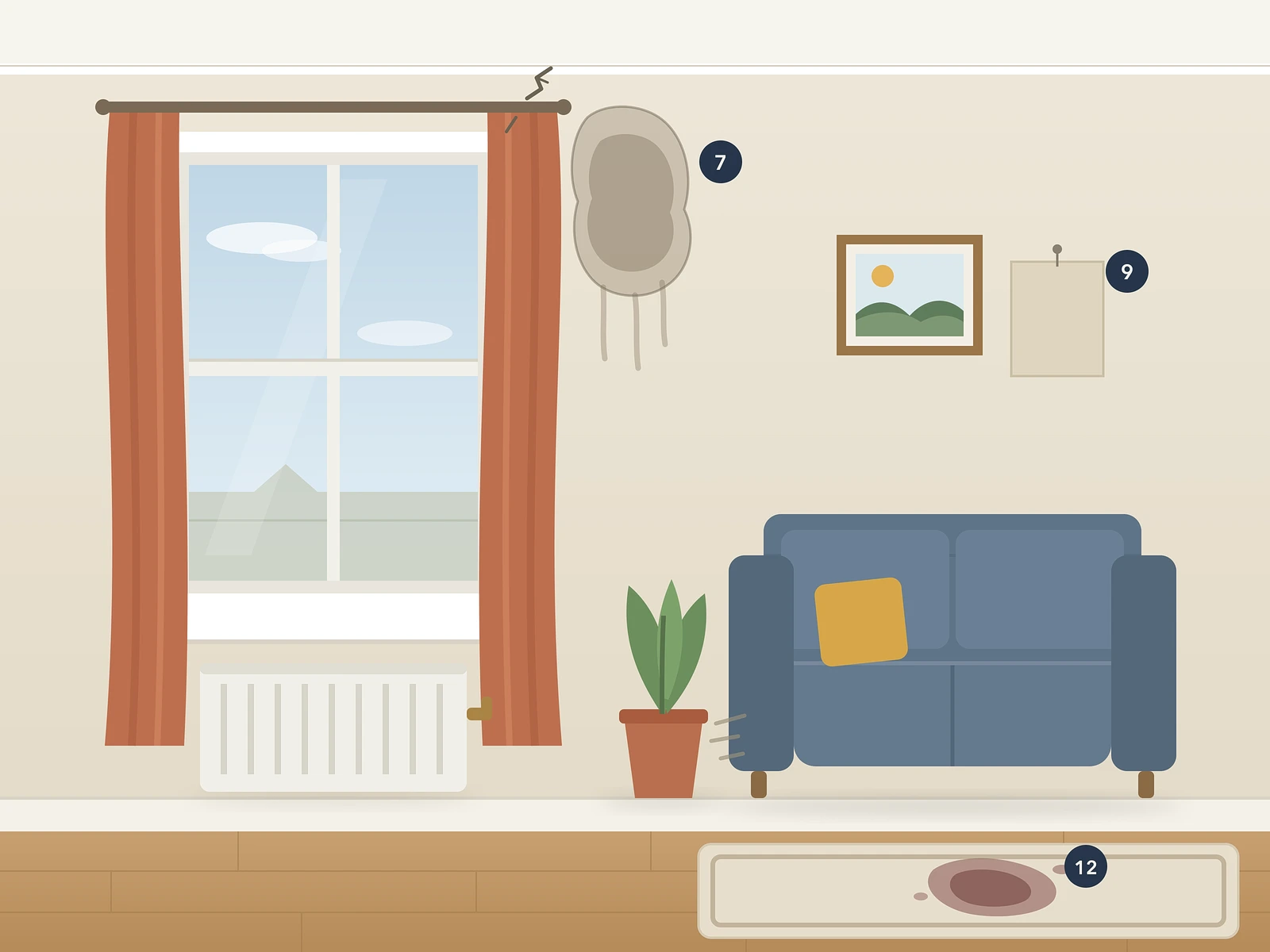

  • Move-in against move-out, side by side, instantly
  • A dedicated arbitration report format for challenged deductions
  • Evidence designed to meet TDS, DPS and mydeposits adjudication standards
The same living room at check-out: a crack and a damp patch by the window, a missing picture frame and a stain on the rug, each marked with a numbered photo pin.
Illustration of a living room at check-in: window, curtains, radiator, sofa, rug and two picture frames, all in good order.
Check-in · 2 Sep 2025Check-out · 28 Aug 2026
04Signed & tamper-evident

Agree and archive

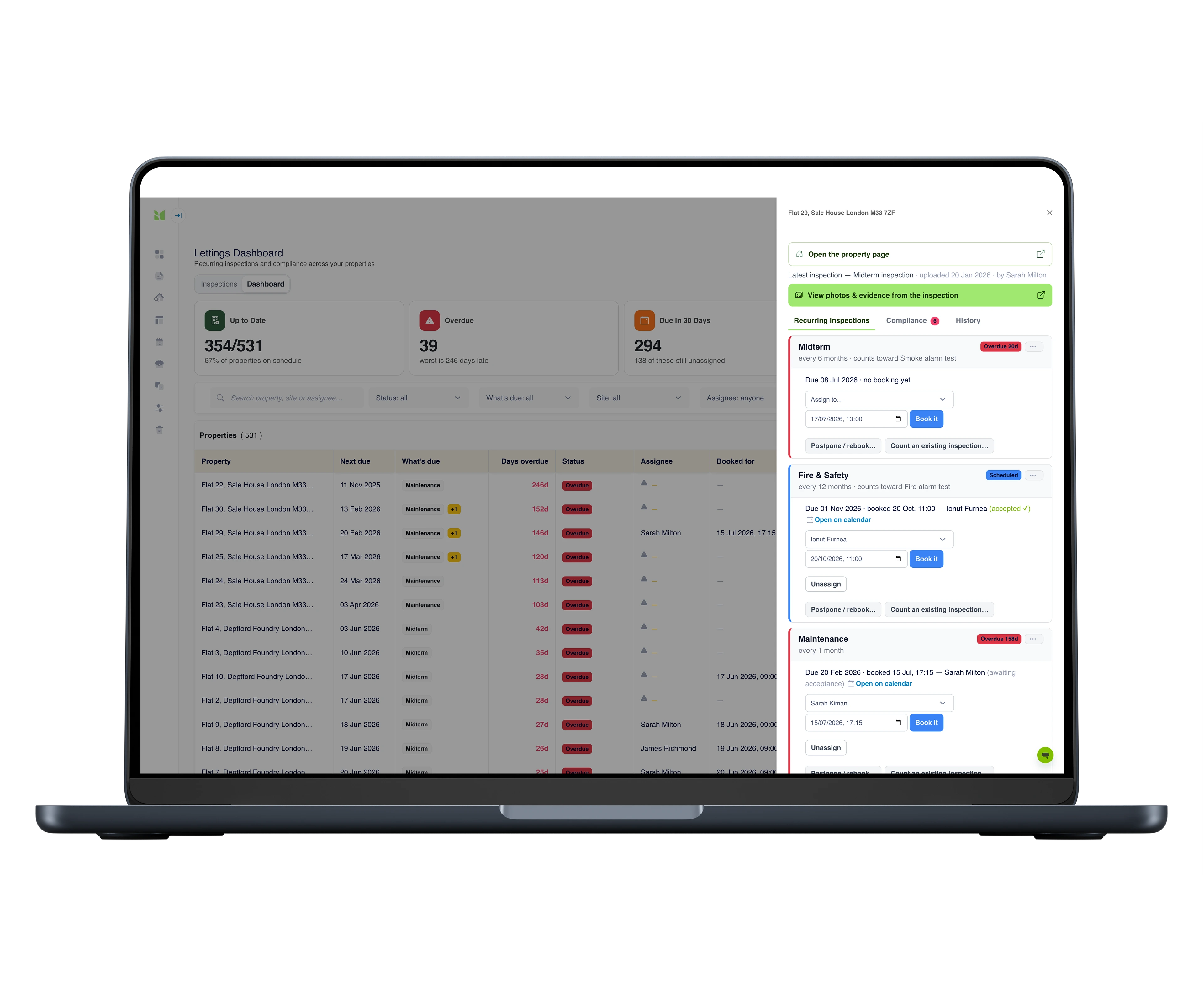
Tenants and landlords comment and agree clause by clause; reports are digitally signed and kept, tamper-evident, for seven years. Flagged repairs push to Fixflo.
  • Tenants review and sign in any browser - no app, no account
  • Reports frozen on generation, kept tamper-evident for seven years
  • Flagged repairs push to Fixflo as work tickets
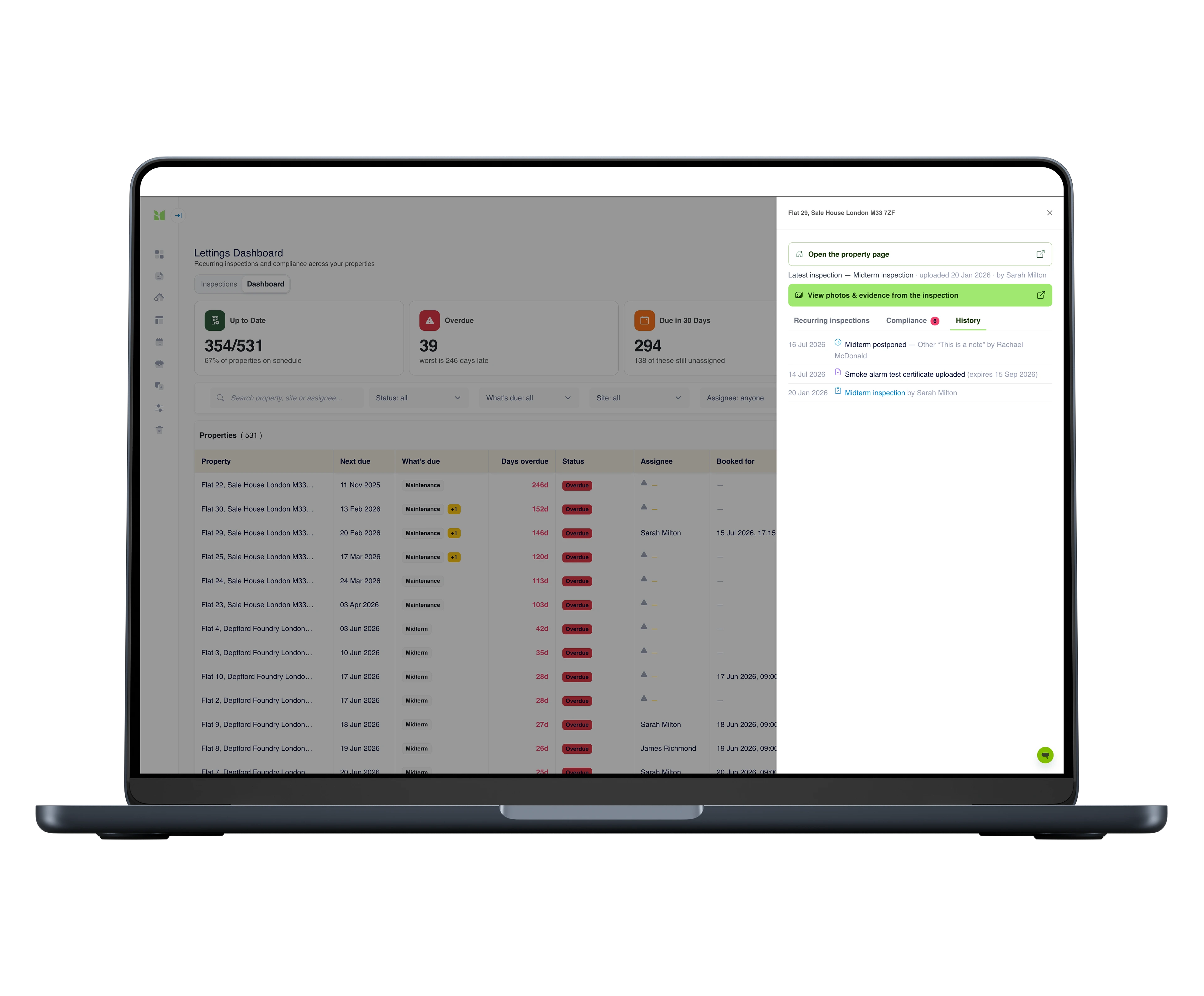
A property's history panel on the compliance dashboard: the inspection trail with dates and names, a smoke alarm certificate upload with its expiry, and a link to the photos and evidence from the latest inspection.
05Whole portfolio, one screen

Scale the portfolio from one place

Assign an inspection from the compliance dashboard and a real booking lands in the clerk's diary. Next visit, assignee and days overdue stay visible per property - however many properties and clerks you add.
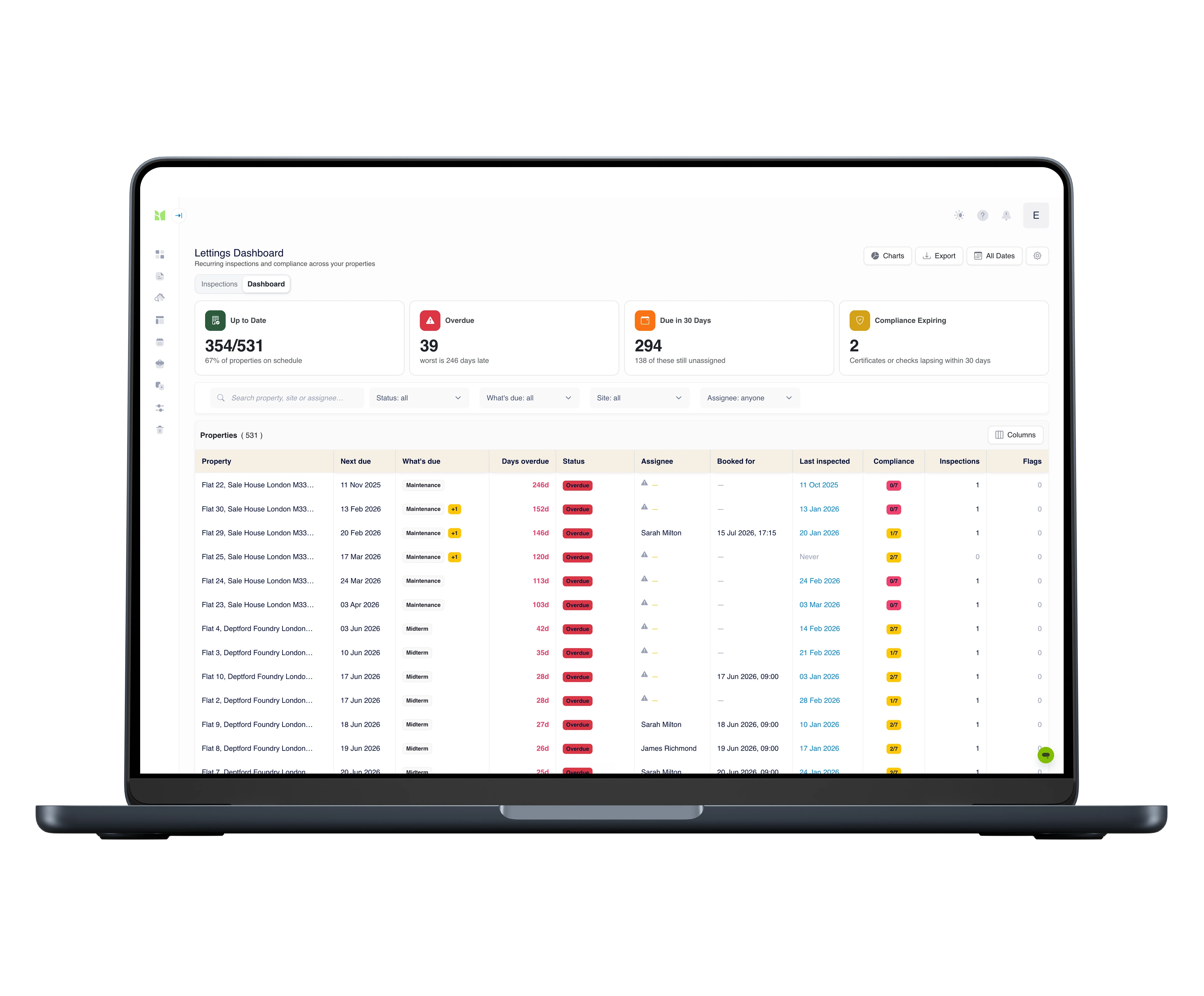
  • Next due, assignee and days overdue per property, on one screen
  • Assign from the dashboard - a real booking lands in the clerk's diary
  • Gas Safety, EICR, smoke alarms and Legionella still in date, at a glance
The compliance dashboard on a laptop: every property as a row with next due date, days overdue, assignee and compliance status.

Templates & workflows

The whole tenancy, templated.

From the day the keys go out to the day they come back - a report format for every visit, each one comparable against the original inventory.

Every template is fully customisable - structure, wording, branding - and your reports carry your identity, not ours.

The tools for the job

Field capture
Field capturePhone & tablet · iOS & Android

Native iOS and Android capture built for the lettings lifecycle: inventories, check-ins, mid-terms and check-outs with photos, dictation and side-by-side comparison - works offline all day.
Web platform

Web platform

Web platform

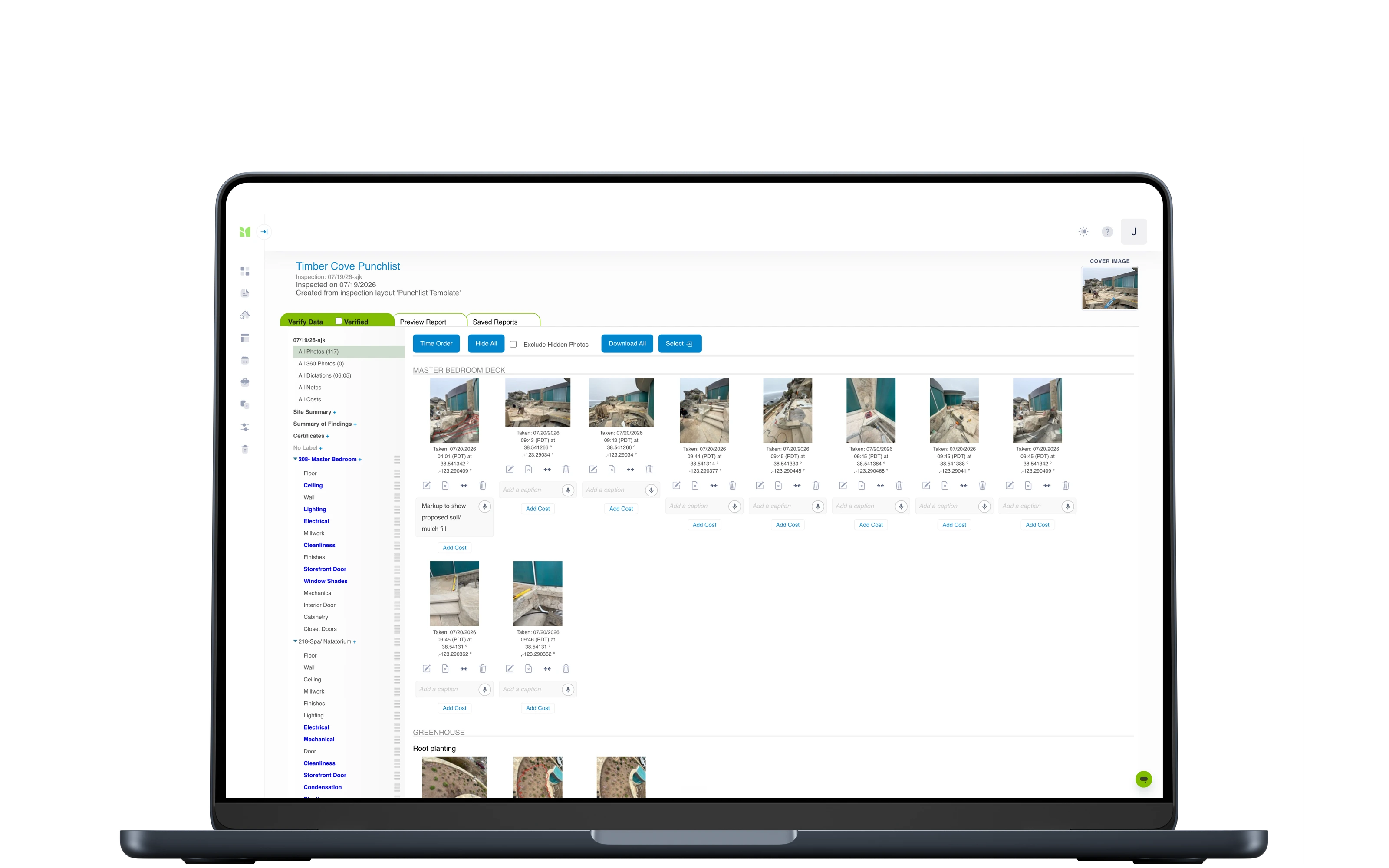
Everything behind the field work: bookings and the team's diary, dictation returned as text, review and edit of everything captured, photo markup in the browser, and reports shared for tenant comment and signature - frozen on generation, with originals kept tamper-evident for seven years.

Compliance dashboard
Compliance dashboardWeb platform

Every property on one screen: what inspection is next due, who is assigned, how many days overdue, and which statutory checks - Gas Safety, EICR, smoke alarms, Legionella - are still in date. Assign from the dashboard and a real booking goes into the team's bookings calendar.
Portfolio dashboard

Portfolio dashboard

Web platform

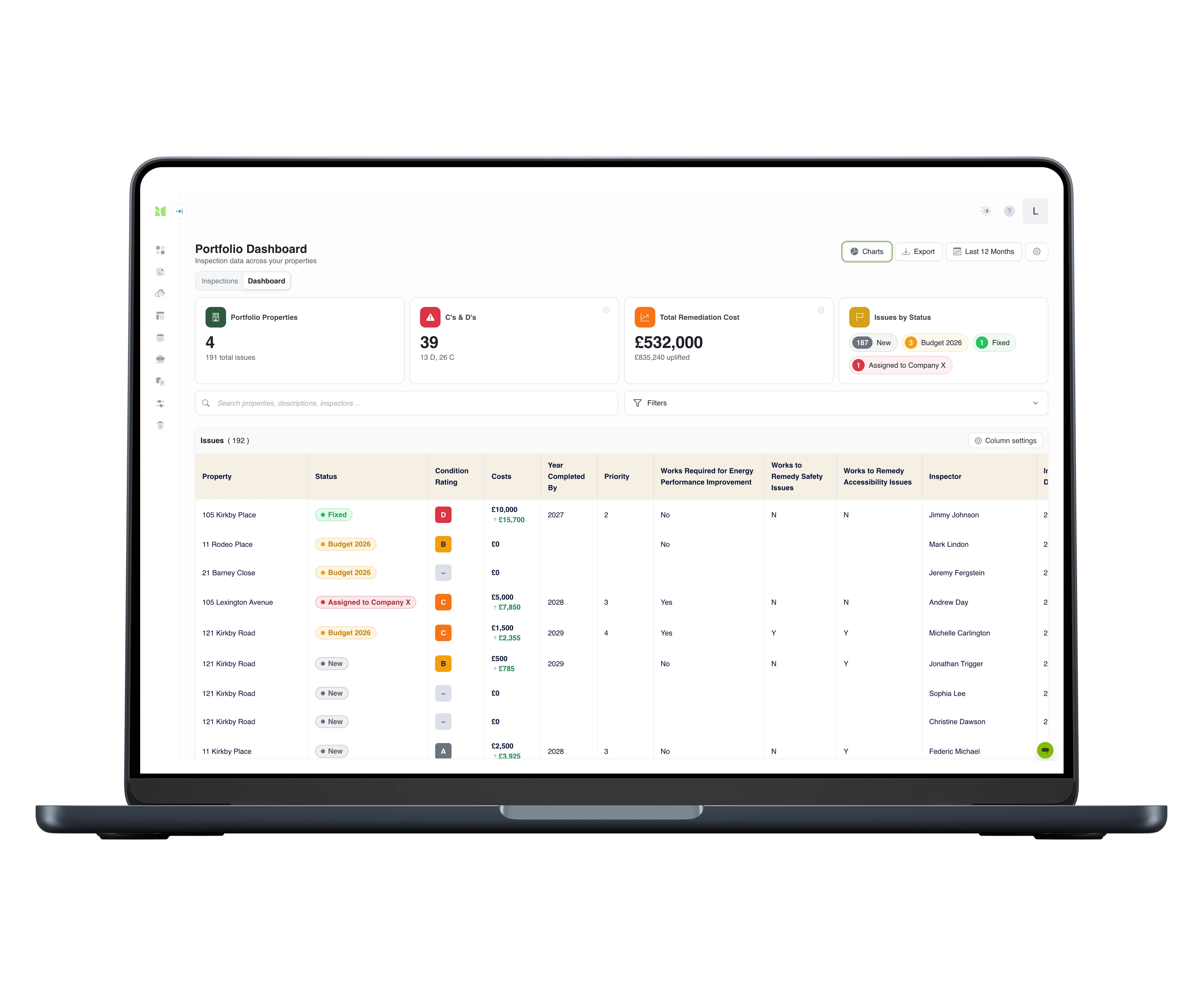
For the repairs and disrepair side of the workload: every issue flagged at an inspection becomes a row in one grid across the whole portfolio - severity, remediation cost and status with a full activity history, charts by any dimension, and Excel export with the audit trail - each row deep-linked to its photo evidence.

Your workflow, end to end

Imfuna sits in the middle of the tools you already run - bookings in, evidence captured, findings pushed on to the systems that act on them.

All integrations →
Fixflo logo

Fixflo

Repairs & maintenance

Publish an inspection and its flagged findings land in Fixflo as maintenance issues - photos, notes and inspection context attached, linked to the property, ready to assign. It works both ways: fetch a property with an open Fixflo issue, inspect it, and push the evidence back.

The Depositary logo

The Depositary

End-of-tenancy & deposit automation

Publish the check-out in Imfuna and it flows into The Depositary’s tenancy conclusion - the report, meter readings and tenant-liability costs land against the deductions, from notice through to refund.

DPS logo

DPS

Deposit disputes

On any completed report, enter the DPS Deposit ID and send - the report goes straight to the Deposit Protection Service’s disputes team, with the sent record kept on the report. UK lettings accounts.

AgentOS logo

AgentOS

Lettings CRM

Connect AgentOS and your branches and properties import into Imfuna, ready to inspect. When the report is finished, it attaches back to the property’s record in AgentOS.

MRI Sales & Lettings logo

MRI Sales & Lettings

Estate & lettings agency software

Properties in MRI Sales & Lettings arrive in Imfuna ready to inspect - inventories, check-ins, check-outs and comparisons - and the completed report returns to the tenancy record.

Excel export, for everything else

Output all inspection data to MS Excel for use in other software - so even tools we don’t talk to natively can work from Imfuna data.

Imfuna provides us a detailed, real-time document that both we the agent and the tenant can feel confident in: it is thorough and outlines perfectly a property's inventory. Imfuna has certainly raised the agency standard for inventory detail which ultimately helps us avoid any disputes, as now everything is more clear and concise with no wriggle room!
Andrew Davies - Property Consultant, iMove Newquay
Side by side
check-out compared against check-in, photo by photo
Clause by clause
tenant comment and digital signature on the record
7 years
originals kept tamper-evident
£500–£2,000
the typical deposit dispute - decided on the quality of the record

The record they rely on

Independent surveyors, national agencies and institutional landlords run their inspections on Imfuna.


A2DominionHunters3 Mills StudiosBelvoirEweMoveDavis TateSpencer MunsonPam Golding PropertiesSeeffAlexander & Co

Questions agents and landlords ask us

Will an adjudicator accept the report?
Adjudicators weigh evidence on consistency, credibility, completeness and relevance - and the burden of proof sits with the landlord's side. An Imfuna record is built for those tests: dated photos room by room, the tenant's comments and signature at check-in, and a check-out compared line by line against that baseline. That is why we say 'designed to meet TDS, DPS and mydeposits adjudication standards' rather than promising outcomes.
What actually changes now Section 21 has gone?
Possession runs through Section 8 grounds, and a judge has to see evidence that the ground is met. The condition record you keep during the tenancy - visits, findings, dates, photos - becomes the paper trail the claim stands on. The habit that used to protect the deposit now protects possession too.
What makes a check-in report robust rather than vague?
Specific beats vague. 'Good condition' loses disputes; a dated photo with the mark described, agreed and signed by the tenant wins them. Imfuna structures the visit so every room carries condition, cleanliness, meters and keys with photos - and cleanliness at check-out is judged against the standard recorded at check-in, which is exactly how adjudicators judge it.
How is fair wear and tear handled?
By evidence, not memory. Side-by-side comparison puts the check-in photo next to the check-out capture with dates attached, so wear-and-tear and betterment arguments are made against a dated record of how the property actually stood - and how long the tenancy ran.
Do tenants get a say in the inventory?
Yes - and that's what makes it hold. Tenants review the report and its photos, comment clause by clause and sign electronically at the start, while everyone can still look at the room. A record agreed then is very hard to argue with later.
Do tenants need an app or an account to review and sign?
No. Reports are shared through a secure online viewer: tenants open the link in any browser, review the report and its photos, comment where they disagree and sign - nothing to install, no account to create.
We issue our own inventory format. Can you build it as a template?
Yes, two ways. The template builder is part of the web platform on every plan, and adjusting our library templates is part of getting set up. Or have us do it: send the report you issue today and an Imfuna specialist rebuilds it end to end - the inventory template your clerks capture with, and the branded report layout your clients receive - with the first version typically within five working days and three versions included, as a one-off from £500. See the custom template build service.
How easy is it to get started?
Sign up and you are in a 30-day free trial with full access, no credit card required. Inventory, check-in, mid-term and check-out structures are already in the library - open a template and start. And setup is not left to you: live online onboarding training for your whole team is included on every plan, with live chat inside the platform when a question comes up.
Is training included?
Yes, on every plan: live online onboarding training for your whole team, plus start-up videos, CPD-certified training and live chat inside the platform. And it is not a one-off - when someone joins the team mid-subscription, they can request the same onboarding at any time, so new starters never learn the system second-hand. On Enterprise, on-site training at your offices can be scoped into your quote.
Can we try it before committing to anything?
Yes. Every new account starts with a 30-day free trial with full access and no credit card required - so there is nothing to cancel if it is not for you. Run a real inventory during the trial and judge Imfuna on your own workflow, not a demo script. When you are ready, you choose a plan on your subscription page; and if the trial passed you by unused, support will look at an extension.

See Imfuna on your own properties

A live demo takes 30 minutes: we look at how you work today and show how it runs in Imfuna.

One useful email a month.

Regulation changes, inspection practice, product updates - written for your line of work, not everyone's. No noise, unsubscribe any time.