
The Imfuna mobile app
Capture everything. Type only what matters.
Photos, notes, sliders, drop-downs, rapid text, check boxes, flags and more - structured as you go, on phone or tablet, with or without signal. By the time you're back in the car, the report is mostly written.
- Since 2009
- Building the property record
- 99.9%+
- Platform uptime, every year
- Cyber Essentials
- Certified
- RICS
- Tech Partner
Capture
Photos that stand as evidence.
The camera is built for the pace of an inspection: rapid-fire shooting, captions as you go, and a quality setting that runs from fast-upload to full-detail close-ups. Every shot carries the time and location it was taken.
- Rapid-fire capture with captions and per-photo notes
- Time and GPS location recorded on every photo
- Photo quality settings, from lean data use to zoomable detail
- As many photos as the job needs
360° · sketch · pins
When a flat photo isn't enough.
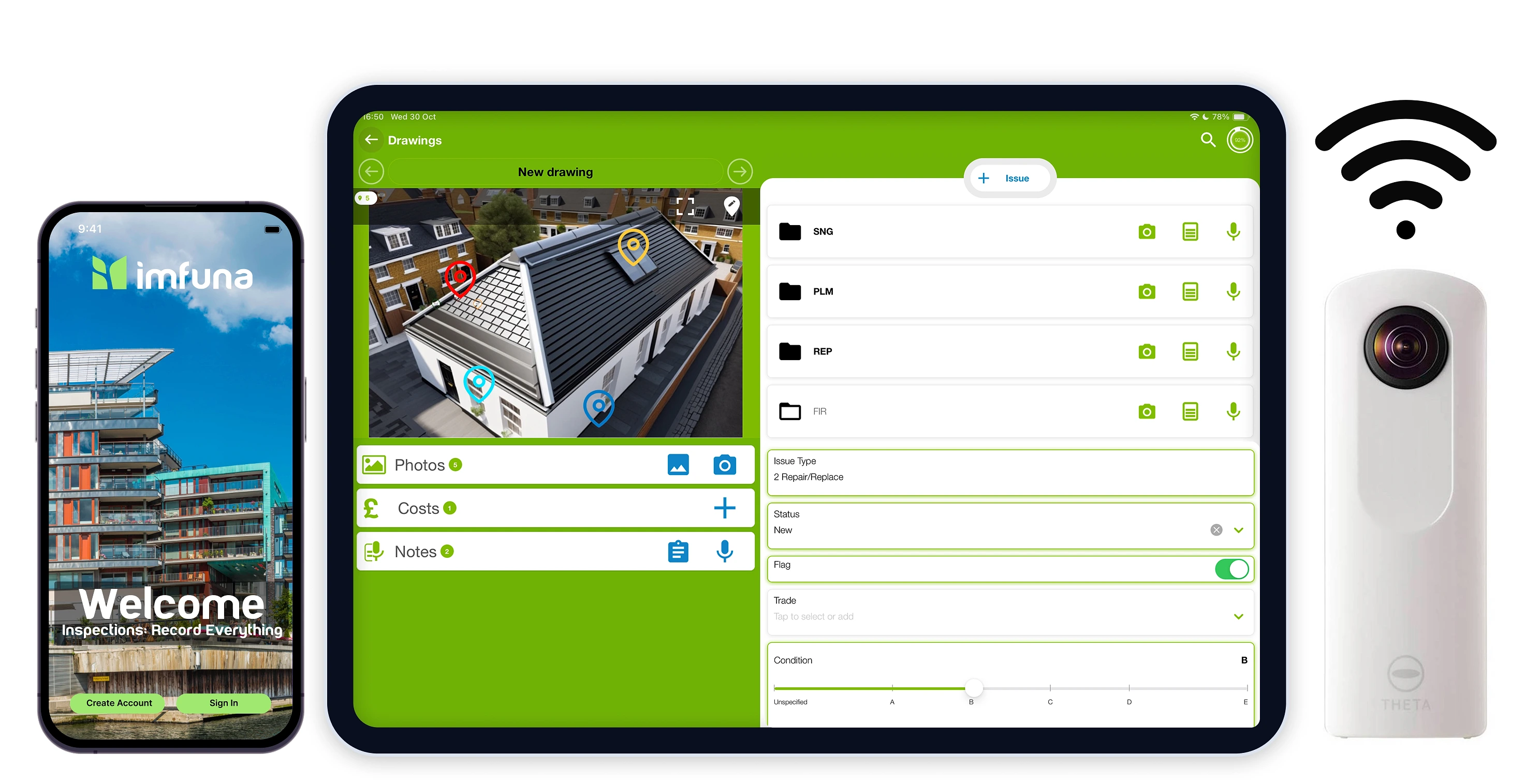
Three separate tools for the jobs a standard photo can't do. 360° capture: pair a Ricoh Theta over WiFi and shoot with a live viewfinder, or drop in any 360° image and the app displays it in its own viewer. The sketch pad: draw freehand when what's needed is a diagram. And floor-plan pins: mark issues on plans and drawings with coded, coloured markers, so every observation has an exact location.
- Ricoh Theta 360° pairing with live viewfinder
- Freehand sketch pad
- Floor-plan and drawing pins, coded and coloured
Dictate
Dictate straight onto the item.
Dictate observations against any item - or against a specific photo - instead of stopping to type. The recording saves to the item it describes and uploads with the inspection, so the words land exactly where they belong in the report.
- Voice notes per item and per photo
- Transcription handled through the platform after upload
Standard wording
Your firm's language, two taps away.
Rapid Text is a phrase library your team controls: pre-approved wording, organised by tags, surfaced by relevance. The app shows phrases related to the item in front of you, remembers what you recently used, and searches the rest - so ten inspectors describe the same defect the same way. Standard notes pre-fill from your template, and the app keeps the original wording so a reviewer can always see what was changed on site.
- Tag-aware phrase library: Related, Recent, and full search
- Template-defined standard notes on every item
- Original wording preserved for compare and restore
Structure
The inspection follows your template.
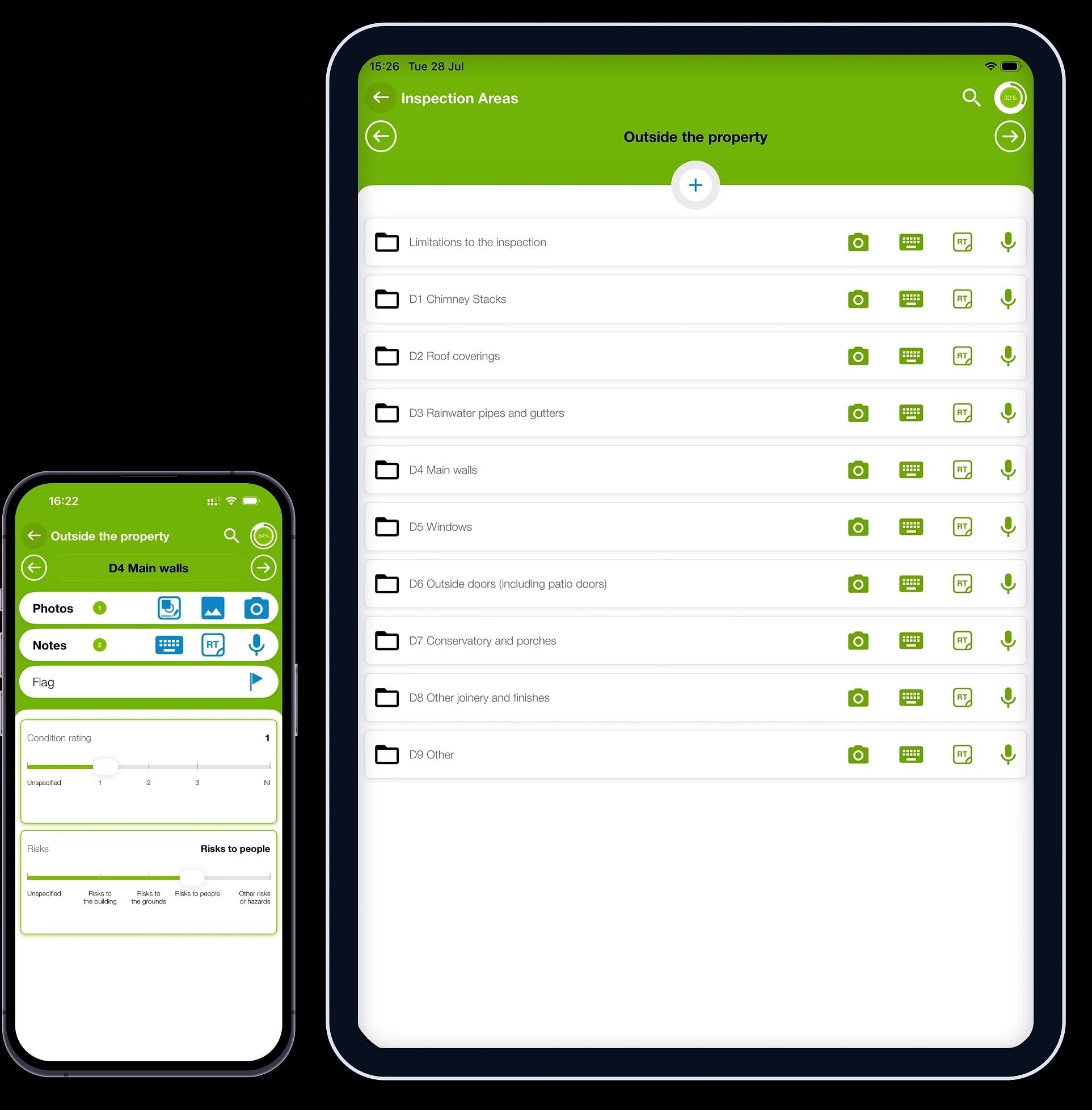
Areas, items and the fields each one needs come from your template: condition ratings on sliders your firm defines, info fields, and costs attached to the item they belong to. Two more journeys are built in: clone a room or a whole inspection to start from a copy, and re-inspect to open a new visit with the previous inspection's full record alongside - photos, notes and answers, all preserved and presented next to today's.
- Areas and items from your own templates
- Condition sliders, info fields and per-item costs
- Flags remembered across inspections
- Clone rooms or whole inspections
- Re-inspect with the previous visit's full record alongside
Offline
Signal to start. None needed after.
Start the inspection while you have signal - the app syncs with the platform and pulls your templates down to the phone. From there, basements, voids, new-builds and rural plots are no problem: the whole visit is captured with no signal, saved on the device. Once you have reception again it starts uploading by itself, or hold it and upload when you're back at the office. Your call.
- Start with signal; capture the whole visit without it
- Templates and standard phrases download to the phone when you start
- Uploading starts by itself the moment reception is back
Sign-off
Signed before you leave the doorstep.
Preview the inspection in full, collect signatures on screen - as many parties as the job needs - and upload. The moment it lands, the web platform takes over: review, branding, delivery.
- Read-only preview before anything is sent
- Multiple on-screen signatures per inspection
The toolkit, in your line of work

Built for the way surveyors work
The capture toolkit, in the detail surveyors ask about - each one on your phone or tablet, on site, with or without signal.
Photos & annotations
Rapid-fire photo capture with captions and per-photo notes, plus the sketch tool for marking up what matters.
Accommodation matrix
Capture in sections that mirror the property - rooms, elements and components, structured by your template.
Floorplan pinpoints
Drop coded, coloured pins on floor plans and drawings so every observation has an exact location.
Smart notes
Standard notes pre-fill from your template and are tailored on site - with the original wording kept, so a reviewer can always compare.
Bespoke phrases
Rapid Text expands your firm's pre-approved wording in two taps: related to the item in front of you, recently used, or searched.
GPS data
Photos carry accurate geo-location and time from the moment of capture.

Built for the tenancy, visit after visit
The edition made for the lettings cycle - inventory and check-in through mid-term to check-out - with a re-inspect journey that opens every visit against the record of the last.
Re-inspect against the baseline
Start the next visit from any previous inspection and every room arrives with what was recorded last time - photos, notes and answers - alongside the empty fields for today.
Photos, side by side
The original photo sits next to the new capture as you shoot - layouts you can switch, with the earlier caption, date and location a tap away.
Previous notes and answers
Each condition answer, note and rating from the earlier visit shows beneath the new entry, so change is judged against the record, not recollection.
Flags that follow through
Anything flagged at an earlier visit arrives marked as flagged before - in its own colour - so an issue raised at check-in is still visible at check-out.
Signatures on the doorstep
Collect signatures on screen at the end of the visit - as many parties as the job needs, each stamped with the time and place of signing.
Offline, previous visit included
The earlier inspection's photos download to the device up front, so the comparison works in a basement flat as well as it does on WiFi.
The complete Mobile App feature list

Mobile app
Start inspections instantly from the Imfuna app. Add new or import existing properties, re-inspect from prior inspections. Add, edit or delete sections and items while you are at the property.

Rapid text
Reusable phrases for common observations: add one with a tap, or multi-select several and edit them in place. Configure your template to make them context-sensitive and the right phrases surface in the right sections - no searching.

Standard notes
Pre-set text plus configurable dropdowns, defined in your template. The inspection basics - weather on the day, attendance, general condition - become a pick from a list instead of a sentence to type.

AI Speech-to-Text
Dictate all your observations as you go - AI Speech-to-Text turns them into report-ready text in seconds.

Camera
Rapid fire photos in seconds with captions, annotations, and metadata. Set your default zoom so every shot opens at the right framing, adjust photo quality when data use matters, and insert images from the mobile gallery.
360° camera
Pair a Ricoh Theta over WiFi and shoot 360° photos with a live viewfinder - or drop in any 360° image and the app displays it in its own viewer.

Quick capture controls
Sliders, checkboxes, dropdowns and toggle flags, defined by your template: rate a condition, tick what is present, and flag anything critical so it stands out. The fewest taps per observation.

Cloning inspections, rooms and items
Clone a room, an item, or a whole inspection - choosing exactly what comes across: inspection info, photos, notes, costs, drawings, signatures.

Data pins on drawings
Place data pins on drawings or images to identify observations.

Digital signatures
Capture signatures directly on-site, ideal for inspectors, tenants, or landlords to confirm findings during the inspection.

Mobile preview inspection
View full inspection content on mobile device and have attendees sign-off on inspection.

Automatic report publishing
Directly from mobile for all inspections or by template.

Side-by-side comparisons
Built for the re-inspect journey: the previous visit's data and photos sit beside what you capture now, so you record what changed - check-out against check-in, this year's survey against last.

Work offline
No network required to conduct inspections. Keep auto-send on and uploads happen as you go - or switch it off and upload when you are back on WiFi at the office.

Comprehensive data capture
Robust Keys, Meters and Certificates, Health & Safety data capture tools. Quick access picks and summary tables.
From site to sent
The inspection finishes on the web platform.
Everything you capture in the field syncs into the Imfuna web platform - where the data gets verified, the report takes your branding, and the finished document goes out to the people waiting on it.
See the web platform- Capture on sitePhotos, notes, ratings, flags and signatures - done by the time you leave.
- UploadAutomatically as you go, or when you are back on WiFi. Your call.
- Verify, brand, deliverReview the data, apply your layout and branding, publish and share.
Questions worth asking before the first inspection
The things prospects and new users ask us most, answered up front. The full how-to library lives in the Help Centre.
Which devices does the app run on?
iPhones and iPads on iOS 13 or later, and Android phones and tablets on Android 7.0 or later - with GPS and an autofocus camera. The app is free to download from the Apple App Store and Google Play; recommended device specifications are in the Help Centre.
Is there a desktop version?
The app is the capture half of Imfuna and runs on phones and tablets. The other half - review, branding and report delivery - is the web platform, which runs in the browser on any desktop or laptop with nothing to install. Any modern browser works; we recommend Chrome.
Does it work with no signal?
Yes - once the inspection is started. Starting needs a connection: the app syncs with the web platform and downloads your templates, and starting a re-inspection also downloads the original inspection's photos. From then on you can work fully offline - everything you capture is saved on the device, and uploading starts by itself once you have reception again, or hold it and upload on WiFi.
Where does the finished report come from?
Not from the phone. The app captures the inspection; once it uploads, the web platform is where the data is verified and the branded PDF report is generated, published and shared. Prefer no clicks at all? Configure it so the moment an inspection is completed, the report is generated automatically from your template.
Which Imfuna app should I download?
Each edition has its own app in the stores: Imfuna Let and Imfuna Rent for lettings and property management, Imfuna Surveyor and Imfuna Home Inspector for surveying and home inspection, and Imfuna Construction Inspector for construction. Download the edition your account belongs to - your login works in that edition's app and web platform. Starting a trial? The sign-up steers you to the right one, and support can confirm before you install.
Are photos really time- and location-stamped?
Every photo taken with the in-app camera records the date, time and GPS location at the moment of capture. Photos imported from the camera roll keep the original date and location from the photo's own metadata, so an imported photo never masquerades as one taken on site.
I'm changing phones - what happens to my inspections?
Uploaded inspections live in your Imfuna account, not on the handset. Sign in on the new device - iPhone or Android - and the app starts empty: fetch the properties you need from the web platform and their details and templates come down. Past inspections stay on the web platform rather than the phone; a re-inspection downloads the original when you start one. Just upload anything still pending on the old phone before you retire it: work that was never uploaded exists only on that device.
See it on a real inspection
Book a demo and walk through an inspection end to end - or start a free trial and take it to your next job.